A beat maker for iPhone that’s fun from the first tap.
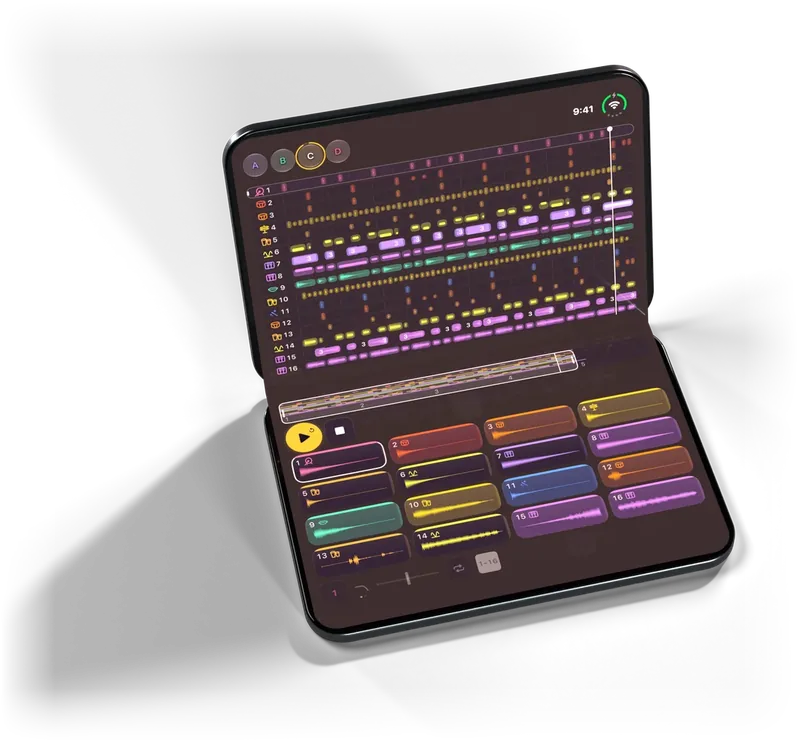
Beatmates is a beat maker for iPhone and iPad, made first for iPhone Duo. Sixteen pads, sounds that already get along, and your song drawing itself as you play. No music knowledge needed.
Beatmates is in beta and comes to the App Store with version 1.1.
What a good beat maker on a phone gets right
Most beat maker apps can play a sample. The difference is in how quickly a beginner gets to something that sounds good, and how long it stays fun after that. Six things to check before you commit to one:
If a pad lags even a little, you stop playing in time and start fighting the app.
Pads sound on the touch itself. Nothing waits for an animation to finish.
A kick, a snare and a bass that sit well together are most of a good beat.
Original sounds made for this app and sorted by kind: 250 in the free version, and 1,000 more with Studio.
Trying things is the fun part, so taking them back has to be safe.
One thing you do is one Undo, every time.
Eight bars on repeat gets old. Look for sections you can switch between.
Four scenes, A to D, each with its own patterns, and a sideways Arrange view to line them up.
Your voice, a pan lid, a sample pack you already own.
Record into an empty pad with the microphone, or import files and whole folders. Importing is free.
A beat nobody hears is half a beat.
Share your song as a video, or export the audio.
Your first beat, in about five minutes
The same steps work in most beat makers. Here is how they look in Beatmates.
- Start from something.
Open a starter kit or tap Surprise for a fresh one. Every pad already has a sound on it.
- Find the groove.
Press Play, then tap the kick and snare pads along with the click. Grooves and the dice button can lay down a pattern for you to play over.
- Record a take.
Press Record and play. What you tap joins the loop on the beat, and the lane above the pads draws it as you go.
- Add a bass line.
Pick a pitched sound or an Aelynth preset, switch to Keys and play it like a little keyboard.
- Make it move.
Open the effects and play with one while the loop runs: filter, tape, bit crush, stutter. Record the movement too, and the song remembers it.
- Build a song.
Switch to scene B and make a variation. Moving between A and B is already a verse and a chorus.
Made for iPhone Duo, plays on any iPhone
iPhone Duo is Apple’s foldable iPhone: a cover screen outside, a big screen inside, and a hinge that stands it up on a table. Beatmates was designed around it: half-folded on a table it is a drum machine with the song above the pads; closed, the cover screen turns your song into a toy you scratch like a record; open flat, two people play it face to face.
It plays on any iPhone with iOS 17 or later, and on iPad from version 1.1, with an Apple Watch app for your wrist.
With friends
Put your phones on the table. Up to four people play one song together, each on their own phone and in their own colour, and anyone can press Play to start everyone on the beat. On one phone, Two players splits the screen so two people can play face to face.
If one phone in the band has Studio or a membership, everyone plays with everything Studio opens while you play together.
Plug in a keyboard
In Beatmates 1.1, popular MIDI keyboards and pad controllers play the moment you plug them in. The keys play the selected sound, the pads play the pads and the eight knobs follow what’s selected. How to use a MIDI keyboard with Beatmates.
What it costs
Beatmates will be free to download, with no time limit: 8 pads, 250 sounds, 4 effects, your own imported sounds, every pose, two players and the band. Studio, $14.99 once, opens all 16 pads, 1,000 more sounds, every effect and export. The membership, $4.99 a month or $49.99 a year with 7 days free on yearly, adds Aelynth, our synth, and every new instrument as it arrives. Sound packs are $14.99 each, and you can hear any pack before you buy it.
Honest limits
- Not on Android. Beatmates is for iPhone and iPad only.
- A toy first, not a desktop DAW. It has 16 pads per song and songs of up to ten minutes. If you mix stems for release, you’ll still want a computer.
- Bands are in the same room. Up to four phones play one song over your local network. It isn’t made for playing together over the internet.
- Not out yet. Beatmates is in beta and comes to the App Store with version 1.1.
Questions
Do I need to know anything about music?
No. Beatmates is made for people who have never made music. Every sound is ready to play, and the screen uses shapes and colours more than words.
Do I need an iPhone Duo?
No. Beatmates is made for iPhone Duo, Apple’s foldable iPhone, but it plays on any iPhone with iOS 17 or later, and on iPad from version 1.1.
Is Beatmates free?
It will be free to download, and the free version has no time limit: 8 pads, 250 sounds, 4 effects, your own sounds, every pose, two players and the band. Studio is $14.99 once.
Can I use my own samples?
Yes. Hold an empty pad to record with the microphone, or import sound files, kits and whole folders. Importing is free.
Can my friends play too?
Yes. Up to four phones in the same room play one song together, and two people can share one phone with Two players.
When can I get it?
Beatmates is in beta now and comes to the App Store with version 1.1. Try the beta now, or join the waitlist and we’ll write once, the day it’s out.